Intro
Skulls are basically the keys of ULTRAKILL. You use them to open doors, activate events, things of that sort. This tutorial will tell you how to set up and use skulls in your own levels, as well as creating buttons for similar purposes.
Skulls and Altars
All of the altars are located in ULTRAKILL Assets/Prefabs/Levels/Interactive, right at the top of the list. For this, we'll pick a red skull altar. 2 of them, actually. One with the skull, and one for the skull to be placed on. Once you bring the prefabs into your scene, their innards should look something like this:
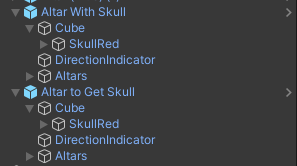
Let's go through these items step by step.
Cubeis the spot where the skulls, or any item, get placed. Inside it is a script calledItemPlaceZone, which we will talk about in a moment.SkullRedis, obviously, the red skull. It turns on and off based on whether or not the skull has been placed there. It's got a script calledItemIdentifier, giving details about how it is as a held item, as well as events for when the item is picked up or put down.Altarsis a container for all the altars. It contains the torch, blue and red skull altars. Unless you for some reason want to go through the effort of manually changing the type of altar it is, don't touch this.
If you're just making a level, Cube and SkullRed (or SkullBlue if you have the blue altar) are all you really need to worry about. If it's enabled, the altar will start with having the skull placed on it. Likewise, if it's disabled, it'll be an empty altar. If we want the altar to actually do things when you take/place the skull, head over to Cube, and look at ItemPlaceZone.
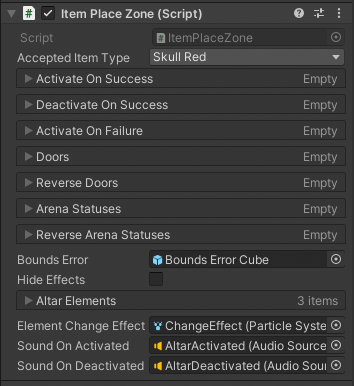
There are quite a few lists here, so let's just go over the ones you'll actually use.
Activate On Success- Activate objects when placing the correct skull on the altar.Deactivate On Success- Deactivate objects when placing the correct skull on the altar.Activate On Failure- all GameObjects placed in this list will be activated upon placing a wrong item on the altar and deactivated upon removal.Doors- all doors placed in this list will be opened upon placing a skull on the altar, and closed upon removal.
Since Reverse Doors, Arena Statuses and Reverse Arena Statuses are less clear to figure out what they do, it's better to use an ObjectActivator connected to the properly covered lists if you want to activate arenas or lock doors.
Feel free to use these to open your doors, create special areas, spawn enemies as a trap, whatever you want!
Buttons
WORK IN PROGRESS